How To Remove A Google Review In 2026: Business Owner’s Guide
Max Dewod
Freelance Writer
27.05.2026
A bad Google review can sting for a day. A fake one can cost calls for months.
But before you type “remove Google review” into the search and start clicking every report button, it helps to know what Google will actually act on.
Google will not remove a review just because it is harsh or feels unfair. The review has to break a Google policy. So the first question is simple: did you leave the review yourself, or did someone leave it on your Business Profile?
Quick Answer: Which Path Applies To You?
If it is your review, you can edit or delete it in Google Maps. If it came from someone else, you cannot just delete Google review content from the profile. You can report it, show why it breaks policy, reply in public, and escalate if the review clearly crosses the line.
Situation
Best Path
You wrote the review
Edit or delete it in Google Maps
A customer left a real negative review
Reply professionally and fix the issue
A review is fake, abusive, or off-topic
Report it for policy violation
Google rejects the report
Escalate with evidence and respond publicly
The review creates legal risk or may be defamatory
Speak with an attorney before sending demands
So, can you delete a Google review? Only if you wrote it. If you own the business but did not write it, Google decides whether it stays or goes.
Can You Remove A Google Review? The Honest Answer
There are two separate jobs hiding inside the phrase how to remove a review from Google. A consumer can remove their own review. A business owner can ask Google to remove someone else’s review only when it breaks policy.
Google’sBusiness Profile Help says businesses can report inappropriate reviews and check the status in the Reviews Management Tool. It also notes that review evaluation typically takes several days. That means reporting is not instant, and it is not guaranteed.
A harsh review from a real customer usually stays up. A review with threats, private information, fake engagement, impersonation, or content unrelated to the business has a better chance. The goal is not to prove that the review hurts you. The goal is to show the exact policy problem.
Path 1: How To Delete A Google Review You Wrote
If you are the reviewer, the process is simple. Google Maps lets users edit or delete reviews they have written. Google’sMaps Help confirms that people can find their reviews under their contributions and then choose edit or delete.
The exact path depends on whether you are using a desktop or the Google Maps app. Use the same Google account that originally left the review, or the review may not appear in your list.
On Desktop
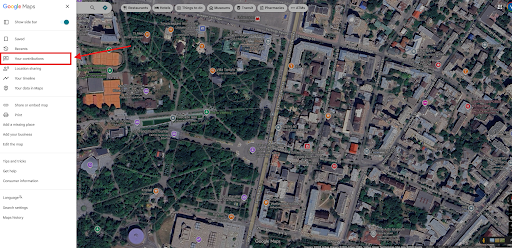
Open Google Maps and sign in to the Google account that left the review. Click the menu icon and open Your contributions.
Go to the Reviews tab.
3. Find the review you want to remove, click the three-dot menu, and choose Delete review.
4. Confirm the deletion when Google asks.
On Mobile
Open the Google Maps app and make sure you are signed in to the account that left the review. Tap Contribute at the bottom of the screen.
2. In the Contribute panel, tap the arrow next to your profile name to open your public contribution profile.
3. Scroll to your Reviews section, find the review, tap the three-dot menu, and choose Delete review.
4. Confirm the deletion when Google asks.
If you cannot find the review, check the Google account first. Many people have more than one. Also search for the business listing directly; your review may appear near the top when you are signed in. If the review is gone, Google may have removed it or the business listing may have changed.
Path 2: How To Remove A Bad Review Someone Else Left
For business owners, this is where it gets annoying. You can search how to remove a bad review on Google all day, but you still cannot delete someone else’s review yourself. You need to report it and give Google a clear reason to remove it.
If the review is fake, abusive, off-topic, or shares private details, report it. If it came from a real customer and just feels unfair, it will probably stay. Then your best move is a steady reply, more real reviews, and better branded results around your business.
Trying to remove a bad Google review without a policy issue often leads nowhere. Google is not deciding whether the review is nice or fair. It is deciding whether that review belongs on Maps and Business Profiles.
The 6 Grounds Google Accepts For Review Removal
Google’sMaps user-generated content policy blocks or restricts content in several categories, including fake engagement, off-topic content, offensive content, personal information, misrepresentation, and conflicts of interest. Read the review against policy first. Then report the strongest reason, not every reason you can think of.
1. Off-Topic
Off-topic reviews are not about a real experience with the business. A political rant, a complaint about the wrong company, or a comment about a news story may fit here. Keep the report tight: “This does not describe an experience with our business.”
2. Spam, Fake, Or Bot-Generated
Some reviews are not really reviews at all. They come from people who never bought, booked, visited, or spoke with the business. Watch for copied wording, several one-star reviews arriving close together, blank profiles, or reviewer names that do not appear anywhere in your customer records.
3. Conflict Of Interest
A review from a competitor, current employee, former employee, owner, or paid reviewer may violate policy. Do not guess. If you have evidence, such as the reviewer’s public role at a competitor, include that clearly.
4. Profanity, Hate Speech, Or Harassment
A review has a stronger removal case when it crosses into threats, slurs, harassment, or direct personal attacks. Plain rudeness usually is not enough. The more specific the abuse is, the easier it is to point Google to the policy issue.
5. Personal Information Or Privacy
Reviews should not expose private details like personal phone numbers, home addresses, medical information, financial data, or private employee information. In the report, identify the exact private detail. Do not send a long explanation when one sentence will do.
6. Misinformation Or Impersonation
A review may be removable if the reviewer pretends to be someone else or misrepresents a relationship with the business. “They are wrong” is weak. “This person claims to be a customer, but our records show no transaction, and the same profile posted similar claims across competitors on the same day” is stronger.
Step-By-Step: How To Flag And Report A Google Review
There are three practical ways to start a Google review report. Use the one that is easiest for your situation, then track what happens.
Flag From Google Maps: Open the business listing in Google Maps, find the review, click the three dots, choose Report review, select the policy reason, and submit.
Report Through Google Business Profile: Sign in with the account that manages the profile, open your reviews, find the review, and report it as inappropriate. This is usually the best route for business owners.
Use The Reviews Management Tool:Google’s Reviews Management Tool lets business owners report review removals and check review status. Use it when you want a cleaner workflow and one place to monitor the case.
Take screenshots before reporting. Save the reviewer name, review date, star rating, review text, profile URL if visible, and any evidence from your CRM, booking system, emails, or call logs. You may need it later.
What To Write In The Report
A good report is short and specific. Do not write a paragraph about how the review damaged revenue. Google is looking for policy violations, so write like you are helping a reviewer find the issue quickly.
Use this template:
This review appears to violate Google’s review policy because [specific policy reason]. It does not describe a real customer experience with our business / appears to involve a conflict of interest / includes private information / contains abusive language.
Evidence: [one or two short facts].
Requested action: Please review this contribution and remove it if it violates Google Maps user-generated content policy.
Here is the main rule: name the policy issue first, then add evidence. A clean report has a better chance than an emotional one.
What To Do If Google Rejects Your Flag
A rejection does not always mean the review is valid. Sometimes the report was too vague. Sometimes the review sits in a gray area. Sometimes you need stronger evidence or a support route.
Start by checking the status in the Reviews Management Tool. If the review still clearly violates policy, gather stronger proof and contact Google Business Profile support. If your account shows access to a Small Business Advisor or support call, use it. Availability can vary, but a call is often better than sending the same weak report again.
While you wait, reply publicly. Keep it calm:
“We take this seriously, but we cannot match this review to a real customer record. Please contact us at [email] so we can investigate.”
For a real bad experience, use a different tone:
“We’re sorry this happened. Please contact [name/email] so we can review the details and work toward a resolution.”
If the review contains false factual claims that may be defamatory, talk to an attorney before sending a legal demand. Do not threaten people in the review reply. Keep legal steps off the public profile unless counsel tells you otherwise.
If removal fails, bury the damage ethically. Ask real customers for honest reviews. Reply to all reviews. Publish strong branded content. Strengthen your website, local profiles, and social pages so one review does not dominate the search experience.
How Long Does Google Take To Remove A Review?
Google says review evaluation typically takes several days. In practice, simple cases may move faster, while fake-review patterns, legal issues, or repeated denials can take longer. Use the Reviews Management Tool to check status instead of filing the same report every few hours.
If you escalate, add time. Support teams need context, and weak evidence slows everything down. A clear timeline, screenshots, and a specific policy reason help more than repeated complaints.
How To Remove A Fake Google Review
If you are dealing with a fake review, do not start with the reviewer’s tone. Start with records. Can you find a customer file, appointment, invoice, call, email, or payment under that name? If not, that is the point to document.
A simple report works better than an angry one. For example: “We cannot match this reviewer to any customer record, booking, invoice, or call history. Three similar one-star reviews also appeared within ten minutes.” That gives Google something concrete to review. In your public reply, stay calm and say you cannot verify the visit, then ask the reviewer to contact you directly. Future customers will judge that reply too.
For competitor attacks, look for patterns. Similar wording, repeated timing, brand-new reviewer profiles, or multiple reviews against businesses in the same category can support a fake engagement claim. Google’sMaps content enforcement reporting also notes that fake or misleading reviews violate policies related to fake engagement and rating manipulation.
For extortion, save everything. Emails, texts, voicemails, screenshots, payment requests, and threats matter. Do not pay for removal. Report the review, preserve the evidence, and consider legal help if the threat is serious.
What You Can’t Remove From Google Reviews
Some reviews are painful but not removable. A real customer can leave a one-star review. They can say the service was slow, the food was bad, the staff was rude, or the price felt too high. Opinion is not automatically a policy violation.
In most cases, Google will not remove:
A real customer complaint
A low star rating with no policy violation
An opinion you disagree with
An old review, just because ownership changed
A review that feels unfair but describes a real experience
A competitor-looking review without clear evidence
This is where owners often waste time. They ask, “Can you delete a Google review if it is unfair?” Usually, no. If it is unfair but policy-compliant, the better move is to reply well and build more recent positive signals.
FAQ
Can a business delete a Google review?
No. A business cannot take down a review just because it appears on its profile. It can report the review, show where it breaks Google’s rules, and then wait for Google’s decision.
What happens when you report a Google review?
Google checks the review against its content rules. After that, the review may come down, stay live, or move into a status flow where you can track the result. This usually takes a few days.
How do I remove a bad review on Google if it’s real?
You probably will not get a really bad review removed. Leave one calm reply, avoid arguing point by point, and give the customer a direct contact if they want to talk. After that, focus on newer reviews from customers who can describe a better experience.
Can I pay someone to delete Google reviews?
Be careful with anyone who promises guaranteed removal. A vendor cannot just take reviews down from Google. The review still has to break policy, and Google still has to agree. Promises like “instant deletion,” “inside access,” or “bulk removal” are usually a red flag.
How many times should I report the same review?
Report it once with the clearest policy reason and the best evidence you have. If Google rejects it, do not keep sending the same report again and again. Build a stronger case, check the Reviews Management Tool, and use support only when the violation is actually clear.
Conclusion
A review only comes down when there is a real reason for Google to remove it. If it is your own review, you can edit it or delete it. If it is on your business profile and someone else wrote it, the job is different: point to the exact policy issue and back it up.
Do not waste time arguing that the review is unfair. Save the proof, report the right violation, answer publicly without sounding defensive, and watch the status. When the damage goes beyond one review and starts showing up in branded search, compareonline reputation management agencies that handle review disputes, suppression, and longer-term reputation repair.