How To Cancel Subscriptions Online In 2026: iPhone, Android, PayPal And 65+ Service Guides
David Roberts
Founder and CEO
11.25.2025
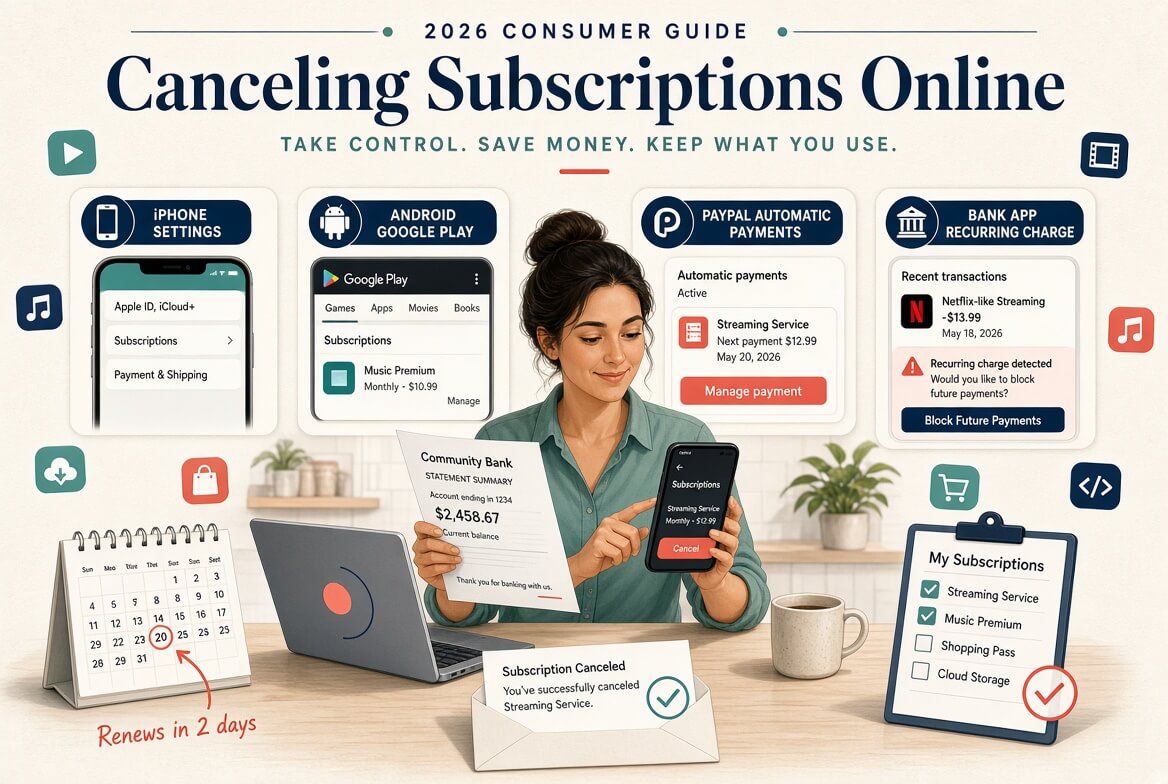
Short answer: cancel a subscription where you are billed for it. If your statement says APPLE.COM/BILL, cancel in iPhone Settings. If it says GOOGLE, cancel in the Play Store. If it says PAYPAL, cancel under PayPal’s automatic payments. Otherwise, cancel in your account on the company’s own website. Do it at least 24 to 48 hours before the renewal date, and keep the confirmation.
Most subscriptions take a minute to start and considerably longer to stop. The steps themselves are rarely hard. What trips people up is cancelling in the wrong place, stopping at the first confirmation screen, or missing a renewal deadline by a day. This page covers the general method that works for almost any service, then links to our step-by-step guide for each service we have covered, with the one catch worth knowing about each.
The single most common reason a cancellation fails is that it was done in the wrong place. If you subscribed inside an iPhone app, Apple holds the subscription and the company cannot end it for you. The merchant name on your bank or card statement tells you where to go.
What your statement says
Who bills you
Where to cancel
APPLE.COM/BILL
Apple App Store
iPhone Settings, then your name, then Subscriptions
GOOGLE * followed by the service
Google Play
Play Store, then Payments and subscriptions
PAYPAL * followed by the service
The service, paid through PayPal
The service’s account page, then PayPal automatic payments as a backstop
AMAZON or AMZN DIGITAL
Amazon Channels or Amazon billing
Your Amazon account, under Memberships and Subscriptions
The company’s own name
The company directly
Your account on the company’s website or app
A cable, phone or internet provider
A bundle partner
The provider’s account or support line
Deleting the app does not cancel anything. The subscription lives with whoever bills you, not on your phone.
How To Find All Your Subscriptions
Before you cancel anything, make a full list. Forgotten subscriptions tend to be the cheap ones that renew yearly, so a single month of statements will miss them. Check these places in order:
Twelve months of bank and card statements. Search for amounts that repeat, and for the words “subscription”, “membership”, “renewal” and “auto”.
Your Apple subscriptions list. Settings, then your name, then Subscriptions. It shows active and expired subscriptions billed by Apple.
Your Google Play subscriptions list. Play Store, then your profile icon, then Payments and subscriptions, then Subscriptions.
PayPal automatic payments. Every merchant you have authorized to charge you again appears here, including ones you no longer use.
Amazon Memberships and Subscriptions. Prime Video channels and Subscribe and Save orders both live here.
Your email. Search for “receipt”, “your subscription”, “free trial” and “renews on”. This catches services billed to a card you rarely look at.
Write each one down with its price, billing cycle, renewal date and where it is billed. That list is also the quickest way to spot two accounts paying for the same thing, which happens more than people expect with family members and work logins.
How To Cancel Subscriptions On iPhone
Open Settings.
Tap your name at the top.
Tap Subscriptions.
Select the subscription you want to end.
Tap Cancel Subscription, then confirm.
If there is no Cancel button and the screen shows an expiry date instead, the subscription is already cancelled and will run to the end of the paid period. If the subscription you are looking for is not listed at all, Apple is not billing it, so cancel it with the company directly. Refunds for Apple-billed subscriptions are requested from Apple at reportaproblem.apple.com, not from the app developer.
How To Cancel Subscriptions On Android
Open the Google Play Store app.
Tap your profile icon at the top right.
Tap Payments and subscriptions, then Subscriptions.
Select the subscription.
Tap Cancel subscription and follow the prompts.
If you have more than one Google account on the phone, switch accounts from the profile icon and check each one. A subscription bought under a second account will not show up under the first.
How To Cancel Automatic Payments In PayPal
Log in to PayPal on the website and open Settings (the gear icon).
Go to Payments, then Manage automatic payments.
Select the merchant.
Click Cancel and confirm.
Cancelling in PayPal stops PayPal from paying the merchant. It does not always close the subscription on the merchant’s side, and some services will then mark your account as overdue. The cleaner order is to cancel in the service’s own account first, then remove the PayPal authorization so nothing can be charged again.
How To Stop Recurring Payments Through Your Bank
Your bank or card issuer can block future recurring charges from a merchant, usually through the app or by phone. Use it when a company will not let you cancel, or when you no longer have access to the account that is being charged.
Treat it as a backstop, not a first step. Blocking a payment does not end your contract, so a service with a minimum term or an annual plan may still say you owe the money and pass it to collections. Cancel with the company first, keep the confirmation, and then ask the bank to block anything that arrives afterwards. Replacing your card does not reliably stop subscriptions either, because many card networks pass the new card details to merchants automatically.
Cancellation Guides By Service
Each guide below covers every billing route for that service, the deadline that decides whether you are charged again, refunds, and what happens to your data. The note after each link is the one thing most likely to catch you out.
Streaming, Music And Video
How to cancel Netflix: if the Cancel button is missing, a phone, TV or bundle partner is billing you.
How to cancel SiriusXM: selling your car does not cancel the subscription, and each radio is cancelled separately.
Shopping, Memberships And Delivery
How to cancel Amazon Prime: if you have not used any Prime benefits since your last charge, Amazon gives a full refund; otherwise you may get a partial one.
How to cancel Uber One: cancel before your renewal day and confirm on both screens; if you cancel within 24 hours of renewal, Uber says any charge is refunded automatically.
How to delete your Uber account: deactivated at once, permanently deleted after 30 days; cancel Uber One and spend Uber Cash first.
How to cancel Walmart+: annual members should not expect a refund for unused months, so time it around the renewal date.
How to cancel a Costco membership: Costco refunds the membership fee at any time, but Executive members should check their 2% Reward first.
How to cancel Roblox Premium: Roblox stopped new Premium sign-ups when Roblox Plus launched in April 2026, and Robux purchases are generally not refundable.
How to cancel Xfinity: internet and TV cannot be cancelled online; call or visit a store, and return the equipment.
How to cancel DIRECTV Stream: cancel online if you stream, call if you have a dish, and return leased equipment within 14 or 21 days.
Mistakes That Lead To Another Charge
Mistake
What happens
How to avoid it
Deleting the app
The subscription keeps billing
Cancel with whoever bills you, then delete the app
Stopping at the first screen
Retention offers look like a confirmation, but nothing is cancelled
Keep going until you see an end date or a confirmation email
Cancelling on renewal day
The next cycle has often already been charged
Cancel at least 24 to 48 hours early
Cancelling in the wrong place
The company has no record of a subscription to cancel
Match the merchant name on your statement first
Forgetting a second account
An old email or phone number keeps paying
Check every account you have used with the service
Letting a free trial run out
The trial converts to a paid plan automatically
Cancel during the trial; most let you keep access until it ends
Disputing before cancelling
The account can be suspended and the debt remains
Cancel first, then dispute only if the company refuses to refund
Always screenshot the final confirmation and keep the email. If a charge arrives later, that record is what gets you a refund quickly.
Can You Get A Refund After Cancelling?
Usually not for the period you have already started. Most subscriptions run to the end of the paid cycle after you cancel and do not prorate. The exceptions are worth knowing:
Unused benefits. Some services refund a period you have not used at all, as Amazon does for Prime.
Short refund windows. Some services offer a refund within a few days of a charge, often only once per account.
Accidental renewals. Many companies will refund an annual renewal you did not mean to keep if you ask quickly and have not used it.
App store purchases. Apple and Google handle refunds for subscriptions they bill, through their own request forms.
Local law. Some countries and US states give consumers cooling-off periods or refund rights that a company’s standard policy does not mention.
The service guides above list the specific refund rules for each one.
Your Rights When A Company Makes Cancelling Hard
The US Federal Trade Commission finalized a “click-to-cancel” rule in 2024 that would have required cancelling to be as easy as signing up, but a federal appeals court vacated it in July 2025 before it took effect. That does not leave consumers without protection. The federal Restore Online Shoppers’ Confidence Act still requires a simple way to stop recurring online charges, the FTC continues to bring cases against companies with deceptive sign-up and cancellation flows, and several states, including California, have their own automatic renewal laws requiring online cancellation.
Local rules are getting stricter too. New York City’s Click to Cancel rule took effect on October 1, 2026. Businesses that sell subscriptions to New York City consumers must explain the terms clearly and let you cancel using the same method you used to sign up, and civil penalties for violations start at $525, according to the city’s Department of Consumer and Worker Protection.
If a company makes cancelling unreasonably hard, keep records of every attempt, cancel through your bank as a backstop, and report it to the FTC at reportfraud.ftc.gov or to your state attorney general. Outside the US, consumer protection agencies such as those in the UK, EU, Canada and Australia handle the same complaints.
Frequently Asked Questions
How do I cancel a subscription online?
Find out who bills you from the merchant name on your statement, then cancel there: iPhone Settings for Apple, the Play Store for Google, or your account on the company’s website for everything else.
Does deleting an app cancel the subscription?
No. The subscription is held by Apple, Google or the company, and it keeps billing until you cancel it there.
How do I see all my subscriptions in one place?
There is no single list. Check your Apple and Google Play subscription lists, PayPal automatic payments, Amazon Memberships and Subscriptions, and twelve months of bank statements.
Can my bank stop a recurring payment?
Yes, most banks and card issuers can block future charges from a merchant. It does not cancel your contract, so cancel with the company as well.
What if there is no cancel button?
Usually it means someone else bills you, such as Apple, Google, PayPal or a bundle partner. If not, contact the company’s support in writing so you have a record, and ask your bank to block further charges.
How far before renewal should I cancel?
At least 24 to 48 hours. Some services, such as Nintendo Switch Online, ask for 48 hours.
Will I lose access as soon as I cancel?
Usually not. Most services keep you subscribed until the end of the period you paid for, then stop renewing.
Is cancelling the same as deleting my account?
No. Cancelling stops the billing and keeps your account and data. Deleting removes the account, and on many services you must cancel the subscription first.
What is the new law about canceling subscriptions?
There is no federal click-to-cancel rule in force, because the FTC’s 2024 rule was vacated by a federal appeals court in July 2025. The newest local rule is New York City’s Click to Cancel rule, which took effect on October 1, 2026 and requires businesses to let New York City consumers cancel using the same method they used to sign up. The federal Restore Online Shoppers’ Confidence Act and state automatic renewal laws, such as California’s, still apply.
What is the hardest subscription to cancel?
There is no official ranking, but the hardest are usually services with contracts or phone-only cancellation. Xfinity internet and TV cannot be cancelled online, ADT can charge 75% of the remaining monthly charges if you cancel during a contract, and gym memberships such as Planet Fitness may need an online, in-person or certified mail cancellation depending on your club. Commitment plans, like some Weight Watchers plans, also keep billing until the term ends.
The Short Version
List every subscription from your statements, Apple, Google Play, PayPal and Amazon.
Match each charge to who bills you.
Cancel there, at least 24 to 48 hours before renewal.
Go all the way through to a confirmation screen and save it.
Use your bank to block anything that still gets charged.
Use the service guides above for the catches specific to each one.